Billing · 3 min read
How to invoice limo clients, with GST, QST and HST done right
What a limo or chauffeur invoice should contain in Canada, how to show GST, QST or HST, and how to send a clean PDF from your phone after each ride.
Published
Invoice every ride the day it ends
Invoices sent weeks later get paid weeks later, and details are forgotten in between. Corporate clients need an invoice for every trip to file their expenses, and private clients pay most readily while the ride is still fresh in their mind. The simplest habit is to issue the invoice the same day the ride is completed.
What a limo invoice should contain
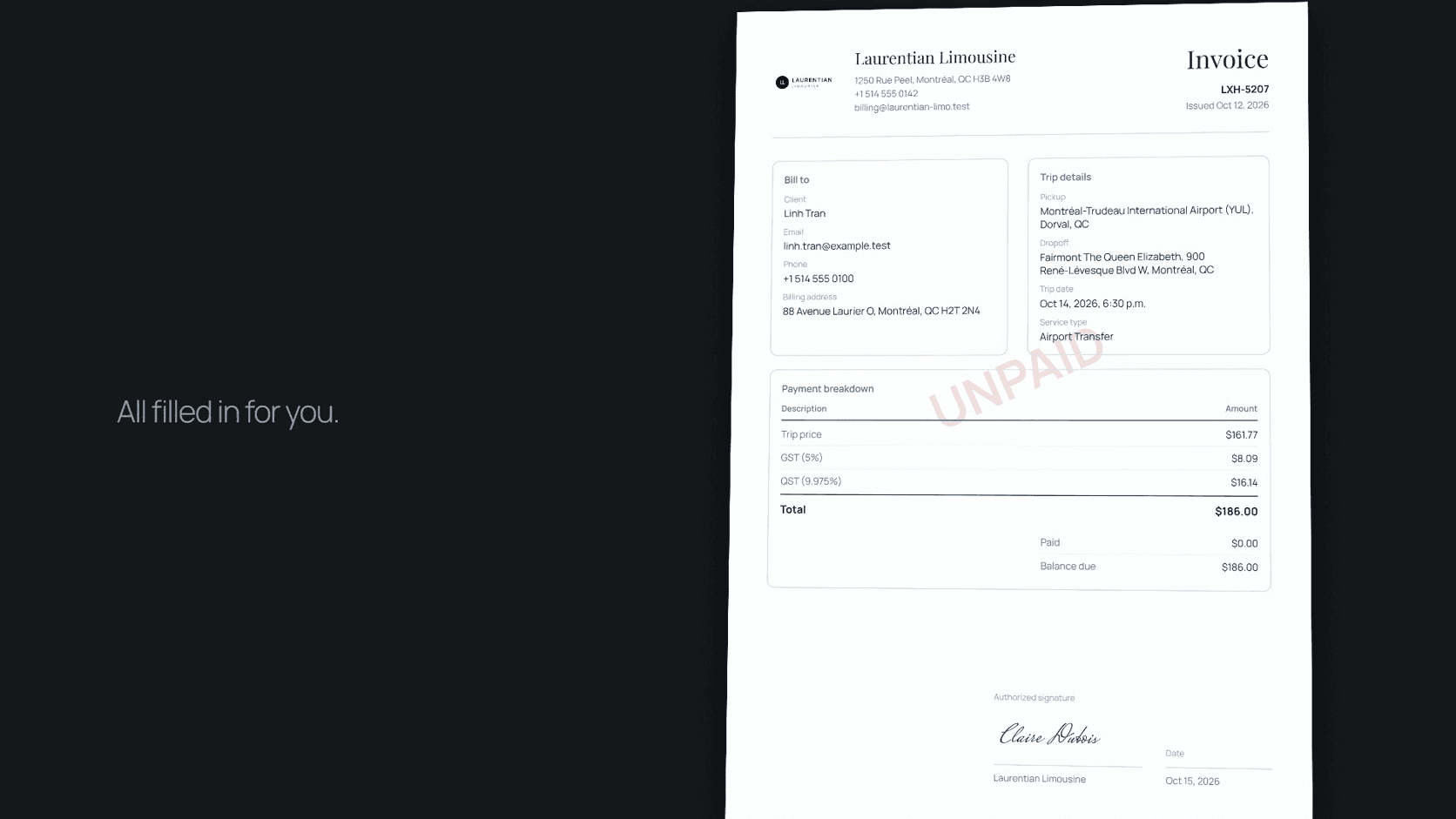
A complete invoice answers every question an accounts department might ask. It shows your legal business name, address and contact details; a unique invoice number and the date issued; the client's name and billing address; and the trip itself, with the date, pickup and drop-off addresses, the service type and the vehicle.
Then come the charges. List the base fare, waiting time, extra stops, tolls and parking, and gratuity if you charge it, each on its own line. Follow them with the tax lines, the total, any amount already paid, the balance due, and your payment terms.
Sales tax lines in Canada
Once you are registered, your tax registration numbers belong on every invoice, and each tax should appear on its own line. In Québec that means GST and QST shown separately, each with your registration number. In Ontario and the Atlantic provinces, a single HST line replaces them. Other provinces charge GST, and some apply a provincial sales tax with their own rules for passenger transportation, so confirm what applies where you operate.
Rates and rules change, and how they apply to your situation depends on details only you and your accountant know. Set the taxes up once, correctly, in whatever tool produces your invoices, and review them whenever a rate changes.
Deposits, cancellations and no-shows
Put your cancellation and no-show policy in the booking confirmation, not only on your website, so the client has agreed to it before the ride. When a fee applies, invoice it like any other charge, with a line describing what happened and when. Deposits for weddings and large events should be recorded against the booking, so the final invoice shows what was paid and what remains.
Sending the invoice from your phone
Many operators finish their day in the car, not at a desk, so invoicing should work from a phone. In LimOperations every booking can produce an invoice PDF with your logo, the client, the trip and the taxes from your company settings already filled in. You share the PDF from your phone by email, text message or WhatsApp, and mark the invoice paid when the money arrives. Invoices are included in the free Starter plan.
Keeping records for tax time
Number invoices in one continuous series, keep a copy of every one, and reconcile payments each month rather than once a year. When the bookings and invoices live in the same system, the monthly check takes minutes: every completed ride should have an invoice, and every invoice should show paid or a balance you are following up.
Invoice checklist
- Legal business name, address and contact details.
- A unique invoice number and the date issued.
- The client's name and billing address.
- Trip date, pickup, drop-off, service type and vehicle.
- Each charge on its own line, then each tax on its own line.
- Your GST, QST or HST registration numbers once registered.
- Total, amount paid, balance due and payment terms.